Phone scans and fax printouts often come out sideways or upside down. Rotating fixes how each page sits, so it reads the right way in any viewer, and the turn is saved in the file itself.
How to rotate with PDF Keel
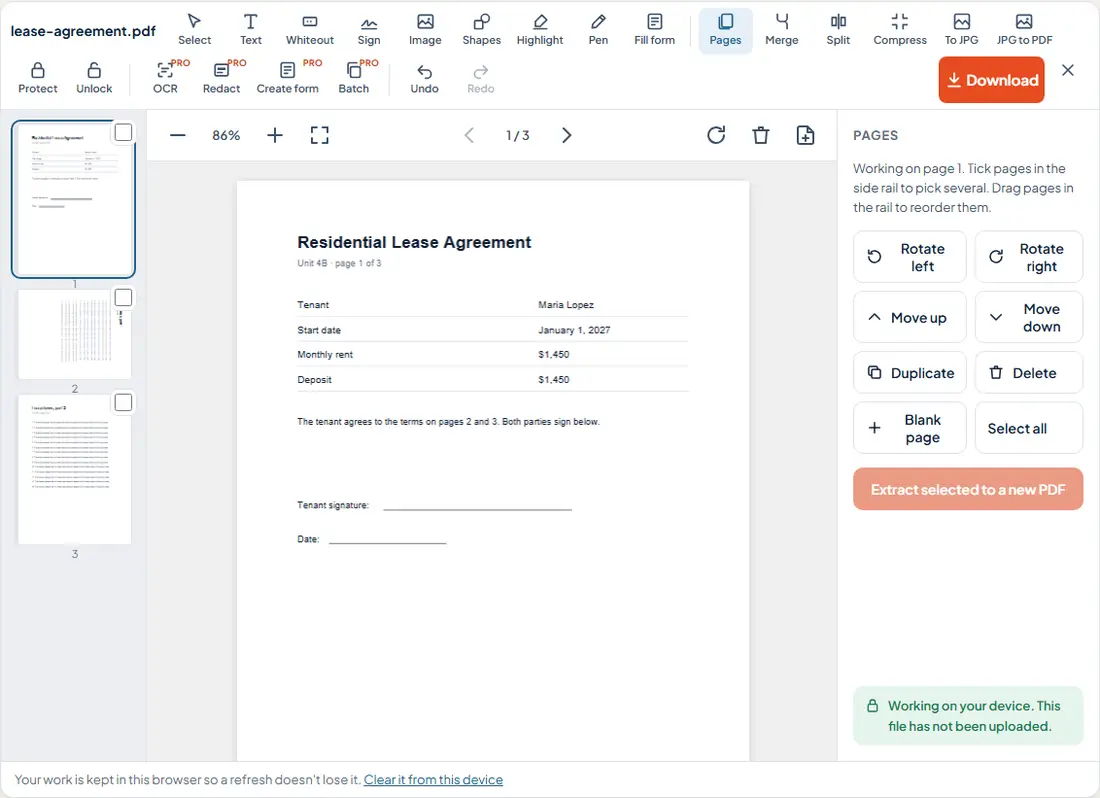
- Open the PDF. The Pages panel opens on the right.
- Click the sideways page in the rail. To turn several at once, tick their boxes.
- Press Rotate right or Rotate left. Each press turns a quarter.
- To turn every page, press Select all first.
- The round arrow above the page does the same quick turn for the page you are viewing.
- Download the corrected PDF.
What it can't do
Pages turn in quarter steps only, so a scan that is slightly crooked cannot be straightened. Rotation changes the page, not the words, so a scan stays a picture and is not made searchable.
Tip
Rotate before you add text or a signature. Anything you already placed turns along with its page, but placing things on an upright page is easier.
Questions
Does rotating lower the quality?
No. The page content is not redrawn. The file just records a new angle for that page.
Can I rotate only page 7?
Yes. Click page 7 in the rail and press Rotate right.
Will it stay rotated when I open it elsewhere?
Yes. The angle is stored in the PDF, so every reader shows it the same way.