A password keeps a PDF closed to anyone who does not know it, even if the file is forwarded or a laptop is lost. PDF Keel encrypts the file with AES-256 right in your browser, so the password never travels anywhere.
How to protect with PDF Keel
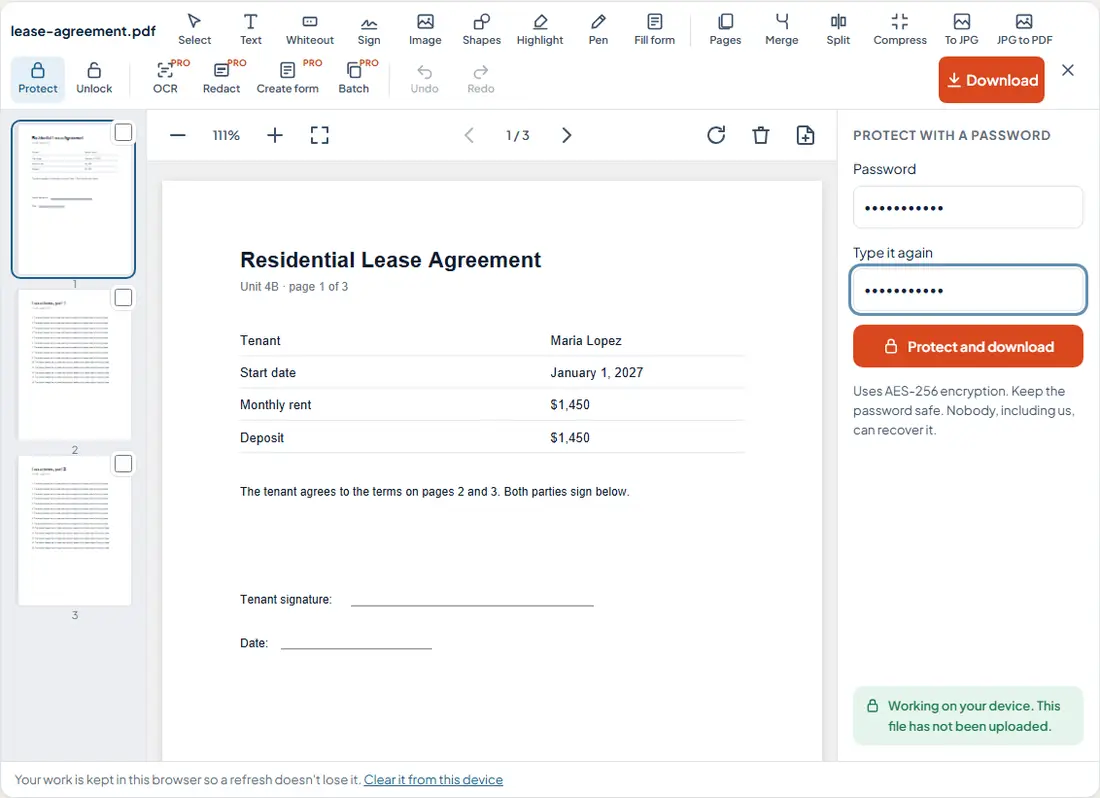
- Open the PDF you want to lock.
- Type a password, then type it again to make sure it is right.
- Press Protect and download.
- Open the new file to check. Your PDF reader will ask for the password.
- Share the password through a different channel than the file, for example by text message.
What it can't do
Nobody can recover a forgotten password, not us and not you. Keep a copy of the original file somewhere safe. The lock controls who can open the file. It does not stop someone who knows the password from printing or copying it.
Tip
A short sentence makes a strong password that is still easy to type, for example "blue harbor at seven". Length matters more than odd symbols.
Questions
Which readers can open the protected file?
Any current PDF reader, including the ones built into Chrome, Edge, Firefox and Safari, and the reader apps on phones.
Can I add edits and a password together?
Yes. Make your changes first, then open Protect. The edits go into the locked file.
How strong is AES-256?
It is the strongest encryption the PDF format offers. The weak point is a short or guessable password.