Need a page as a picture for a slide, a chat message or a website? This tool draws each PDF page as a JPG or PNG image at the quality you choose.
How to pdf to jpg with PDF Keel
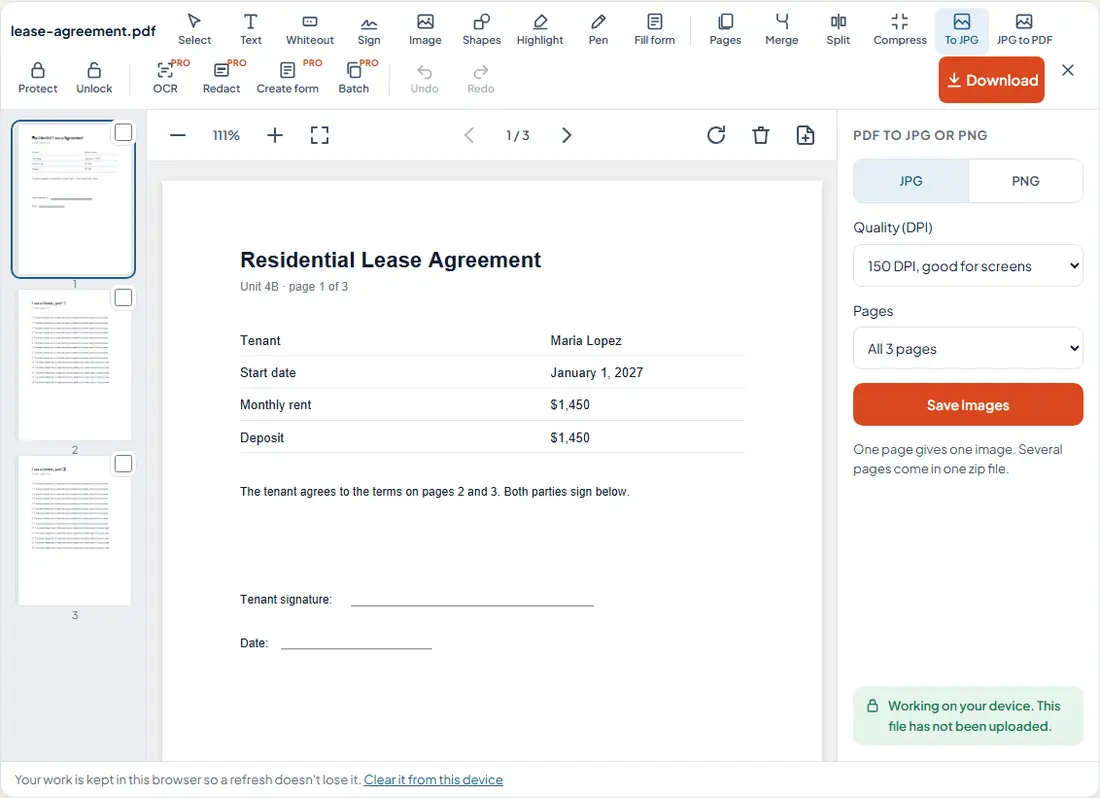
- Open the PDF.
- Pick JPG for small files, or PNG for crisp text and sharp lines.
- Pick a DPI: 72 for quick previews, 150 for screens, 300 for printing.
- Choose All pages, or tick some in the rail and choose Selected pages.
- Press Save images. One page gives one image. More pages arrive in a zip.
What it can't do
The result is a picture of the page, so the text inside cannot be selected or edited. This tool does not pull out the original photos embedded in the PDF. It draws the whole page instead.
Tip
Add your edits first. Signatures, highlights and text you added are drawn into the images too, which is handy for sharing a marked-up page in a chat.
Questions
How big will the images be?
At 150 DPI a Letter page is about 1275 by 1650 pixels. At 300 DPI it is twice as wide and twice as tall.
What are the files called?
The PDF name plus the page number, for example report-page-3.jpg.
Why use PNG?
PNG keeps small text and thin lines sharp. JPG files are smaller but can look soft around letters.